Showing posts with label membuat. Show all posts
Showing posts with label membuat. Show all posts
Sunday, November 24, 2013
Cara Membuat Bayangan Gambar Seperti Kaca Atau Cermin Di Photoshop

Setelah sebelumnya Infonetku berbagi tentang info download gratis, info internet, tips blog, Untuk kali infonetku coba untuk berbagi tetang tips dan trik-trik sederhana photoshop untuk pemula.
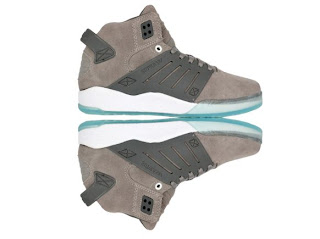
Tips yang akan kita pelajari disini adalah cara Cara Membuat Bayangan Gambar Seperti Kaca, Seperti gambar diatas, kita akan coba untuk membuat bayangan sepatu yang sebelah kiri menjadi seperti yang disebelah kanan.Ok Langsung saja,
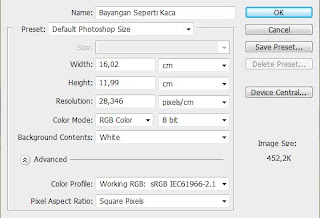
1. Langkah awal sobat buat halaman kerja berukuran default Photoshop Size.
Kemudian klik oke, perhatikan gambag dibawah..
Setelah itu, tambahkan gambar yang akan sobat buat bayangannya, untuk contoh kali ini saya menggunakan gambar sepatu, caranya klik file>>place. selanjutnya pilih photo yang akan sobat buat bayangannya, lalu klik Place.Lalu atur ukuran gambarnya Sekitar 1/4 dari besar halaman kerja atau backgroud, dengan menggunakan Move Tool atau tekan V pada keyboard sobat, lalu tempatkan gambar tsb 1/2 halaman sebelah atas.
2. Langkah Selanjutnya duplikat gambar tadi, dengan cara klik edit>>copy lalu klik lagi edit>>paste.
supaya cepat gunakan Move Tool (V), klik pada gambar sambil tekan tombol Alt Lalu tarik gambarnya kebawah, maka gambar tadi akan terduplikat.Lalu balikkan gambar kedua tadi menghadap kebawah, caranya klik edit>>Transform>>Flip Vertical. Kemudian letakkan gambar kedua tadi sehingga tapak sepatu gambar pertama dan kedua saling berdampingan,lihat gambar kiri bawah.
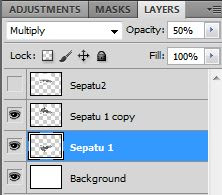
Nah kemudian, rubah Opacity gambar kedua mejadi 50%, caranya Lihat side Bar sebelah kanan, nah lihat pada side bar layer, rubah Opacity dari 100 menjadi 50.supaya gambar yang kedua mejadi lebih pudar dari gambar kedua supaya seperti bayangan.kalau bingung liaht side bar layer, sobat coba cari seperti yang terlihat pada gambar sebelah kanan diatas.
Baca Selanjutnya


Saturday, November 2, 2013
Cara Membuat Efek Awan

Mas Bro belajar CorelDRAW harus siap untuk menggambar secara manual, misalnya untuk menggambar awan saja anda harus berusaha keras, jangan mengharapkan ada plugin yang menyediakan khusus untuk membuat awan pada CorelDRAW seperti yang banyak disediakan untuk keperluan Photoshop atau Ilustrator, tapi dengan CorelDRAW anda akan mempunyai pengalaman lebih, yaitu bisa membuat secara manual sesuai dengan kreasi sendiri, tidak ada ketergantungan dengan plugin dan sejenisnya yang kita tinggal klik secara instant;
Yang paling enak dan fleksibel untuk membuat object awan atau mega kita menggunakan 3-Point Curve, yang letaknya pada Toolbox;

Mas Bro akan dengan mudahnya untuk menggambar object awan;

Setelah selesai menggambar object awan, buat object kotak dengan Rectangle tool juga letaknya di Toolbox, kemudian beri warna gradasi dari biru ke putih dengan Interactive Fill tool (G) juga letaknya pada Toolbox, untuk memposisikan letak kotak dibawah object awan anda tekan Shift+PageDown di keyboard. Memang untuk membuat object apa saja itu menu yang dipakai ada pada Toolbox, jadi menu dasar yang harus anda pelajari adalah futur-fitur yang ada pada Toolbox;

Buang outline pada kedua object tersebut, dengan klik kanan pada Color Palette, pilih yang tanda X;

Kemudian pada object mega/awan, anda Convert to Bitmap... Selanjutnya pada Menu Bar pilih Bitmaps --> Blur --> Gaussian Blur... dan atur parameter sesuai dengan kemauan Mas Bro sekalian;

Dan duplikat/gandakan, bisa dengan Copy Paste atau bisa juga dengan menekan tombol + (plus) pada Numpad, atur size (besarnya) pada tiap-tiap object awan, dan seleksi menjadi satu kemudian Convert to Bitmap... dan beri sedikit efek Transparan.

Selesai, selamat mencoba.
Thursday, October 24, 2013
Cara Mudah Membuat Tombol Sharing Is Sexy Keren Dengan J query
Halo sobat blogger.. Dengan Menu Cara Mudah Membuat Tombol Sharing Is Sexy Keren Dengan J-query>>Cara Mudah Membuat Tombol Sharing Is Sexy Keren Dengan J-query>>Cara Mudah Membuat Tombol Sharing Is Sexy Keren Dengan J-query>>
Ketemu lagi di blog Sederhana ini. Dan pada kesempatan kali ini saya akan membagikan cara membuat tombol sharing is sexy menggunakan j-query, sebelumnya saya sudah membuat postingan yang juga menggunakan J-query yaitu cara membuat Cara Mudah Tooltip dengan jQuery namun kali ini perbedaanya adalah, kita akan membuat Tombol Sharing Is Sexy Keren Dengan J-query dimana pada tombol share/Situs Bookmarknya itu jauh lebih banyak, namun yang nampak/terlihat hanya baris teratas/pertama jadi tidak terlalu memakan tempat, nah disinilah fungsi J-query yang akan menyembunyikan sebagian tombol dan akan terlihat setelah kursor diarahkan ke tombol tersebut.
DEMO

Untuk mebuatnya, Silahkan ikuti langkah-langkah dibawah ini.1. Masuk dulu ke akun blogger anda
2. Setelah berada di Dashboard Klik Design --> Edit HTML
3. Backup Dulu Template anda dengan mengKlik Download Full Template
3. Centang Expand Template Widget
3. Centang Expand Template Widget
4. Cari Kode </head>
5. Copy kode di bawah lalu paste di Bawah/Sesudah kode </head>
<script src=http://ajax.googleapis.com/ajax/libs/jquery/1.5.0/jquery.min.js
type=text/javascript />
<link href=http://bloggerblogwidgets.googlecode.com/svn/trunk/auto-hide-social-bookmarking-way2blogging.css
rel=stylesheet type=text/css />
<script type="text/javascript">
jQuery(document).ready(function() {
jQuery(.sexy-bookmarks a.external).attr("target", "_blank");
var sexyBaseHeight = jQuery(.sexy-bookmarks).height();
var sexyFullHeight = jQuery(.sexy-bookmarks ul.socials).height();
if (sexyFullHeight > sexyBaseHeight) {
jQuery(.sexy-bookmarks-expand).hover(
function() {
jQuery(this).animate({
height: sexyFullHeight + 15 + px
}, {
duration: 800,
queue: false
});
}, function() {
jQuery(this).animate({
height: sexyBaseHeight + px
}, {
duration: 800,
queue: false
});
});
}
if (jQuery(.sexy-bookmarks-center)) {
var sexyFullWidth = jQuery(.sexy-bookmarks).width();
var sexyBookmarkWidth = jQuery(.sexy-bookmarks:first ul.socials li).width();
var sexyBookmarkCount = jQuery(.sexy-bookmarks:first ul.socials li).length;
var numPerRow = Math.floor(sexyFullWidth / sexyBookmarkWidth);
var sexyRowWidth = Math.min(numPerRow, sexyBookmarkCount) * sexyBookmarkWidth;
var sexyLeftMargin = (sexyFullWidth - sexyRowWidth) / 2;
jQuery(.sexy-bookmarks-center).css(margin-left, sexyLeftMargin + px);
}
});
</script>
6. Kemudian untuk menepatkannya di bawah postingan cari kode <data:post.body/>
7. Copy-Paste kode HTML di bawah ini tepat Sebelum/di bawah kode <data:post.body/>
<b:if cond=data:blog.pageType == "item">
<div id=post-width-w2b style=width:600px;>
<div class=sexy-bookmarks-bg-caring sexy-bookmarks sexy-bookmarks-expand sexy-bookmarks-center >
<ul class=socials>
<li class=sexy-yahoomail>
<a class=external expr:href="http://compose.mail.yahoo.com/?Subject= " + data:post.title + "&body=Link:"+ data:post.url rel=nofollow title=Email this via Yahoo! Mail/>
</li>
<li class=sexy-gmail>
<a class=external expr:href="https://mail.google.com/mail/?ui=2&view=cm&fs=1&tf=1&su=" + data:post.title + "&body=Link:" + data:post.url rel=nofollow title=Email this via Gmail/>
</li>
<li class=sexy-twitter>
<a class=external expr:href="http://twitter.com/home?status=" + data:post.title + " -- " + data:post.url rel=nofollow title=Tweet This!/>
</li>
<li class=sexy-facebook>
<a class=external expr:href="http://www.facebook.com/share.php?v=4&src=bm&u=" + data:post.url + "&t=" + data:post.title onclick=window.open(this.href,'sharer','toolbar=0,status=0,width=626,height=436'); return false; rel=nofollow title=Share this on Facebook/>
</li>
<li class=sexy-linkedin>
<a class=external expr:href="http://www.linkedin.com/shareArticle?mini=true&url=" + data:post.url + "&title=" + data:post.title + "&summary=&source=" rel=nofollow title=Share this on LinkedIn/>
</li>
<li class=sexy-googlebuzz>
<a class=external expr:href="http://www.google.com/buzz/post?url=" + data:post.url + "&imageurl=" rel=nofollow title=Post on Google Buzz/>
</li>
<li class=sexy-yahoobuzz>
<a class=external expr:href="http://buzz.yahoo.com/submit/?submitUrl=" + data:post.url + "&submitHeadline=" + data:post.title + "&submitSummary=&submitCategory=science&submitAssetType=text" rel=nofollow title=Buzz up!/>
</li>
<li class=sexy-blogger>
<a class=external expr:href="http://www.blogger.com/blog_this.pyra?t&u=" + data:post.url + "&n=" + data:post.title + "&pli=1" rel=nofollow title=Blog this on Blogger/>
</li>
<li class=sexy-googlebookmarks>
<a class=external expr:href="http://www.google.com/bookmarks/mark?op=add&bkmk=" + data:post.url + "&title=" + data:post.title rel=nofollow title=Add this to Google Bookmarks/>
</li>
<li class=sexy-googlereader>
<a class=external expr:href="http://www.google.com/reader/link?url=" + data:post.url + "&title=" + data:post.title + "&srcUrl=" + data:post.url + "&srcTitle=" + data:post.title + "&snippet=" rel=nofollow title=Add this to Google Reader/>
</li>
<li class=sexy-stumbleupon>
<a class=external expr:href="http://www.stumbleupon.com/submit?url=" + data:post.url + "&title=" + data:post.title rel=nofollow title=Stumble upon something good? Share it on StumbleUpon/>
</li>
<li class=sexy-delicious>
<a class=external expr:href="http://delicious.com/post?url=" + data:post.url + "&title=" + data:post.title rel=nofollow title=Share this on del.icio.us/>
</li>
<li class=sexy-digg>
<a class=external expr:href="http://digg.com/submit?phase=2&url=" + data:post.url + "&title=" + data:post.title rel=nofollow title=Digg this!/>
</li>
<li class=sexy-comfeed>
<a class=external expr:href=data:blog.homepageUrl + "feeds/" + data:post.id + "/comments/default?alt=rss" rel=nofollow title=Subscribe to the comments for this post?/>
</li>
<li class=sexy-orkut>
<a class=external expr:href="http://promote.orkut.com/preview?nt=orkut.com&tt=" + data:post.title + "&du=" + data:post.url + "&cn=" rel=nofollow title=Promote this on Orkut/>
</li>
<li class=sexy-designbump>
<a class=external expr:href="http://designbump.com/submit?url=" + data:post.url + "&title=" + data:post.title + "&body=" rel=nofollow title=Bump this on DesignBump/>
</li>
<li class=sexy-reddit>
<a class=external expr:href="http://reddit.com/submit?url=" + data:post.url + "&title=" + data:post.title rel=nofollow title=Share this on Reddit/>
</li>
<li class=sexy-designfloat>
<a class=external expr:href="http://www.designfloat.com/submit.php?url=" + data:post.url + "&title=" + data:post.title rel=nofollow title=Submit this to DesignFloat/>
</li>
<li class=sexy-friendfeed>
<a class=external expr:href="http://www.friendfeed.com/share?title=" + data:post.title + "&link=" + data:post.url rel=nofollow title=Share this on FriendFeed/>
</li>
<li class=sexy-zabox>
<a class=external expr:href="http://www.zabox.net/submit.php?url=" + data:post.url rel=nofollow title=Box this on Zabox/>
</li>
<li class=sexy-dzone>
<a class=external expr:href="http://www.dzone.com/links/add.html?url=" + data:post.url + "&title=" + data:post.title + "&description=" rel=nofollow title=Add this to DZone/>
</li>
<li class=sexy-webblend>
<a class=external expr:href="http://thewebblend.com/submit?url=" + data:post.url + "&title=" + data:post.title + "&body=" rel=nofollow title=Blend this!/>
</li>
<li class=sexy-propeller>
<a class=external expr:href="http://www.propeller.com/submit/?url=" + data:post.url rel=nofollow title=Submit this story to Propeller/>
</li>
<li class=sexy-tumblr>
<a class=external expr:href="http://www.tumblr.com/share?v=3&u=" + data:post.url + "&t=" + data:post.title rel=nofollow title=Share this on Tumblr/>
</li>
<li class=sexy-squidoo>
<a class=external expr:href="http://www.squidoo.com/lensmaster/bookmark?" + data:post.url rel=nofollow title=Add to a lense on Squidoo/>
</li>
<li class=sexy-posterous>
<a class=external expr:href="http://posterous.com/share?linkto=" + data:post.url + "&title=" + data:post.title + "&selection=" rel=nofollow title=Post this to Posterous/>
</li>
<li class=sexy-technorati>
<a class=external expr:href="http://technorati.com/faves?add=" + data:post.url rel=nofollow title=Share this on Technorati/>
</li>
<li class=sexy-hotmail>
<a class=external expr:href="http://mail.live.com/?rru=compose?subject=" + data:post.title + "&body=Link: " + data:post.url rel=nofollow title=Email this via Hotmail/>
</li>
<li class=sexy-bebo>
<a class=external expr:href="http://www.bebo.com/c/share?Url=" + data:post.url + "&Title=" + data:post.title rel=nofollow title=Share this on Bebo/>
</li>
<li class=sexy-bitacoras>
<a class=external expr:href="http://bitacoras.com/anotaciones/" + data:post.url rel=nofollow title=Submit this to Bitacoras/>
</li>
<li class=sexy-blinklist>
<a class=external expr:href="http://www.blinklist.com/index.php?Action=Blink/addblink.php&Url=" + data:post.url + "&Title=" + data:post.title rel=nofollow title=Share this on Blinklist/>
</li>
<li class=sexy-100zakladok>
<a class=external expr:href="http://www.100zakladok.ru/save/?bmurl=" + data:post.url + "&bmtitle=" + data:post.title rel=nofollow title=Add this to 100 bookmarks/>
</li>
<li class=sexy-blogengage>
<a class=external expr:href="http://www.blogengage.com/submit.php?url=" + data:post.url rel=nofollow title=Engage with this article!/>
</li>
<li class=sexy-blogmarks>
<a class=external expr:href="http://blogmarks.net/my/new.php?mini=1&simple=1&url=" + data:post.url + "&title=" + data:post.title rel=nofollow title=Mark this on BlogMarks/>
</li>
<li class=sexy-bobrdobr>
<a class=external expr:href="http://bobrdobr.ru/addext.html?url=" + data:post.url + "&title=" + data:post.title rel=nofollow title=Share this on BobrDobr/>
</li>
<li class=sexy-bonzobox>
<a class=external expr:href="http://bonzobox.com/toolbar/add?pop=1&u=" + data:post.url + "&t=" + data:post.title + "&d=" rel=nofollow title=Add this to BonzoBox/>
</li>
<li class=sexy-boxnet>
<a class=external expr:href="https://www.box.net/api/1.0/import?url=" + data:post.url + "&name=" + data:post.title + "&description=&import_as=link" rel=nofollow title=Add this link to Box.net/>
</li>
<li class=sexy-current>
<a class=external expr:href="http://current.com/clipper.htm?url=" + data:post.url + "&title=" + data:post.title rel=nofollow title=Post this to Current/>
</li>
<li class=sexy-diigo>
<a class=external expr:href="http://www.diigo.com/post?url=" + data:post.url + "&title=" + data:post.title + "&desc=" rel=nofollow title=Post this on Diigo/>
</li>
<li class=sexy-ekudos>
<a class=external expr:href="http://www.ekudos.nl/artikel/nieuw?url=" + data:post.url + "&title=" + data:post.title + "&desc=" rel=nofollow title=Submit this to eKudos/>
</li>
<li class=sexy-evernote>
<a class=external expr:href="http://www.evernote.com/clip.action?url=" + data:post.url + "&title=" + data:post.title rel=nofollow title=Clip this to Evernote/>
</li>
<li class=sexy-faqpal>
<a class=external expr:href="http://www.faqpal.com/submit?url=" + data:post.url rel=nofollow title=Submit this to FAQpal/>
</li>
<li class=sexy-fwisp>
<a class=external expr:href="http://fwisp.com/submit?url=" + data:post.url rel=nofollow title=Share this on Fwisp/>
</li>
<li class=sexy-globalgrind>
<a class=external expr:href="http://globalgrind.com/submission/submit.aspx?url=" + data:post.url + "&type=Article&title=" + data:post.title rel=nofollow title=Grind this! on Global Grind/>
</li>
<li class=sexy-hackernews>
<a class=external expr:href="http://news.ycombinator.com/submitlink?u=" + data:post.url + "&t=" + data:post.title rel=nofollow title=Submit this to Hacker News/>
</li>
<li class=sexy-hatena>
<a class=external expr:href="http://b.hatena.ne.jp/add?mode=confirm&url=" + data:post.url + "&title=" + data:post.title rel=nofollow title=Bookmarks this on Hatena Bookmarks/>
</li>
<li class=sexy-hyves>
<a class=external expr:href="http://www.hyves.nl/profilemanage/add/tips/?name=" + data:post.title + "&text=Text about this site+-+" + data:post.url + "&rating=5" rel=nofollow title=Share this on Hyves/>
</li>
<li class=sexy-identica>
<a class=external expr:href="http://identi.ca//index.php?action=newnotice&status_textarea=Reading:" + data:post.title + "+-+from+" + data:post.url rel=nofollow title=Post this to Identica/>
</li>
<li class=sexy-izeby>
<a class=external expr:href="http://izeby.com/submit.php?url=" + data:post.url rel=nofollow title=Add this to Izeby/>
</li>
<li class=sexy-jumptags>
<a class=external expr:href="http://www.jumptags.com/add/?url=" + data:post.url + "&title=" + data:post.title rel=nofollow title=Submit this link to JumpTags/>
</li>
<li class=sexy-kaevur>
<a class=external expr:href="http://kaevur.com/submit.php?url=" + data:post.url rel=nofollow title=Share this on Kaevur/>
</li>
<li class=sexy-mail>
<a class=external expr:href="mailto:?subject=%22" + data:post.title + "%22&body=Link: " + data:post.url + " (sent via Way2blogging) " rel=nofollow title=Email this to a friend?/>
</li>
<li class=sexy-memoryru>
<a class=external expr:href="http://memori.ru/link/?sm=1&u_data[url]=" + data:post.url + "&u_data[name]=" + data:post.title rel=nofollow title=Add this to Memory.ru/>
</li>
<li class=sexy-meneame>
<a class=external expr:href="http://meneame.net/submit.php?url=" + data:post.url rel=nofollow title=Submit this to Meneame/>
</li>
<li class=sexy-misterwong>
<a class=external expr:href="http://www.mister-wong.com/addurl/?bm_url=" + data:post.url + "&bm_description=" + data:post.title + "&plugin=sexybookmarks" rel=nofollow title=Add this to Mister Wong/>
</li>
<li class=sexy-moemesto>
<a class=external expr:href="http://moemesto.ru/post.php?url=" + data:post.url + "&title=" + data:post.title rel=nofollow title=Add this to MyPlace/>
</li>
<li class=sexy-mylinkvault>
<a class=external expr:href="http://www.mylinkvault.com/link-page.php?u=" + data:post.url + "&n=" + data:post.title rel=nofollow title=Store this link on MyLinkVault/>
</li>
<li class=sexy-myspace>
<a class=external expr:href="http://www.myspace.com/Modules/PostTo/Pages/?u=" + data:post.url + "&t=" + data:post.title rel=nofollow title=Post this to MySpace/>
</li>
<li class=sexy-n4g>
<a class=external expr:href="http://www.n4g.com/tips.aspx?url=" + data:post.url + "&title=" + data:post.title rel=nofollow title=Submit tip to N4G/>
</li>
<li class=sexy-netvibes>
<a class=external expr:href="http://www.netvibes.com/share?title=" + data:post.title + "&url=" + data:post.url rel=nofollow title=Submit this to Netvibes/>
</li>
<li class=sexy-netvouz>
<a class=external expr:href="http://www.netvouz.com/action/submitBookmark?url=" + data:post.url + "&title=" + data:post.title + "&popup=no" rel=nofollow title=Submit this to Netvouz/>
</li>
<li class=sexy-newsvine>
<a class=external expr:href="http://www.newsvine.com/_tools/seed&save?u=" + data:post.url + "&h=" + data:post.title rel=nofollow title=Seed this on Newsvine/>
</li>
<li class=sexy-ning>
<a class=external expr:href="http://bookmarks.ning.com/addItem.php?url=" + data:post.url + "&T=" + data:post.title rel=nofollow title=Add this to Ning/>
</li>
<li class=sexy-nujij>
<a class=external expr:href="http://nujij.nl/jij.lynkx?t=" + data:post.title + "&u=" + data:post.url + "&b=" rel=nofollow title=Submit this to NUjij/>
</li>
<li class=sexy-oknotizie>
<a class=external expr:href="http://oknotizie.virgilio.it/post?url=" + data:post.url + "&title=" + data:post.title rel=nofollow title=Share this on OkNotizie/>
</li>
<li class=sexy-pfbuzz>
<a class=external expr:href="http://pfbuzz.com/submit?url=" + data:post.url + "&title=" + data:post.title rel=nofollow title=Share this on PFBuzz/>
</li>
<li class=sexy-pingfm>
<a class=external expr:href="http://ping.fm/ref/?link=" + data:post.url + "&title=" + data:post.title + "&body=" rel=nofollow title=Ping this on Ping.fm/>
</li>
<li class=sexy-plaxo>
<a class=external expr:href="http://www.plaxo.com/?share_link=" + data:post.url rel=nofollow title=Share this on Plaxo/>
</li>
<li class=sexy-plurk>
<a class=external expr:href="http://www.plurk.com/m?content=9+beautiful+web+forms+for+free+download+-+" + data:post.url + "&qualifier=shares" rel=nofollow title=Share this on Plurk/>
</li>
<li class=sexy-printfriendly>
<a class=external expr:href="http://www.printfriendly.com/print?url=" + data:post.url rel=nofollow title=Send this page to Print Friendly/>
</li>
<li class=sexy-pusha>
<a class=external expr:href="http://www.pusha.se/posta?url=" + data:post.url + "&title=" + data:post.title rel=nofollow title=Push this on Pusha/>
</li>
<li class=sexy-scriptstyle>
<a class=external expr:href="http://scriptandstyle.com/submit?url=" + data:post.url + "&title=" + data:post.title rel=nofollow title=Submit this to Script & Style/>
</li>
<li class=sexy-slashdot>
<a class=external expr:href="http://slashdot.org/bookmark.pl?url=" + data:post.url + "&title=" + data:post.title rel=nofollow title=Submit this to SlashDot/>
</li>
<li class=sexy-sphinn>
<a class=external expr:href="http://sphinn.com/index.php?c=post&m=submit&link=" + data:post.url rel=nofollow title=Sphinn this on Sphinn/>
</li>
<li class=sexy-springpad>
<a class=external expr:href="http://springpadit.com/clip.action?body=&url=" + data:post.url + "&format=microclip&title=" + data:post.title + "&isselected=true" rel=nofollow title=Spring this on SpringPad/>
</li>
<li class=sexy-strands>
<a class=external expr:href="http://www.strands.com/tools/share/webpage?title=" + data:post.title + "&url=" + data:post.url rel=nofollow title=Submit this to Strands/>
</li>
<li class=sexy-stumpedia>
<a class=external expr:href="http://www.stumpedia.com/submit?url=" + data:post.url + "&title=" + data:post.title rel=nofollow title=Add this to Stumpedia/>
</li>
<li class=sexy-techmeme>
<a class=external expr:href="http://twitter.com/home/?status=Tip+@Techmeme+" + data:post.url + "--" + data:post.title + "&source=Way2blogging" rel=nofollow title=Tip this to TechMeme/>
</li>
<li class=sexy-tipd>
<a class=external expr:href="http://tipd.com/submit.php?url=" + data:post.url rel=nofollow title=Share this on Tipd/>
</li>
<li class=sexy-tomuse>
<a class=external expr:href="mailto:tips@tomuse.com?subject=" + data:post.title + "&body=Link: " + data:post.url rel=nofollow title=Suggest this article to ToMuse/>
</li>
<li class=sexy-twittley>
<a class=external expr:href="http://twittley.com/submit/?title=" + data:post.title + "&url=" + data:post.url + "&desc=&pcat=Technology&tags=" rel=nofollow title=Submit this to Twittley/>
</li>
<li class=sexy-viadeo>
<a class=external expr:href="http://www.viadeo.com/shareit/share/?url=" + data:post.url + "&title=" + data:post.title + "&urlaffiliate=31138" rel=nofollow title=Share this on Viadeo/>
</li>
<li class=sexy-virb>
<a class=external expr:href="http://virb.com/share?external&v=2&url=" + data:post.url + "&title=" + data:post.title rel=nofollow title=Share this on Virb/>
</li>
<li class=sexy-wikio>
<a class=external expr:href="http://www.wikio.com/sharethis?url=" + data:post.url + "&title=" + data:post.title rel=nofollow title=Share this on Wikio/>
</li>
<li class=sexy-wykop>
<a class=external expr:href="http://www.wykop.pl/dodaj?url=" + data:post.url + "&title=" + data:post.title rel=nofollow title=Add this to Wykop!/>
</li>
<li class=sexy-xerpi>
<a class=external expr:href="http://www.xerpi.com/block/add_link_from_extension?url=" + data:post.url + "&title=" + data:post.title rel=nofollow title=Save this to Xerpi/>
</li>
<li class=sexy-yandex>
<a class=external expr:href="http://zakladki.yandex.ru/userarea/links/addfromfav.asp?bAddLink_x=1&lurl=" + data:post.url + "&lname=" + data:post.title rel=nofollow title=Add this to Yandex.Bookmarks/>
</li>
<li class=sexy-way2blogging>
<a class=external href=http://acer-c4yber.blogspot.com rel=follow title=Grab this Widget></a>
</li>
</ul>
<div class=sexy-link>
</div>
</div>
</div>
</b:if>
8. Save Dan Lihat Hasilnya
Catatan :
Untuk mengubah gambar / tulisan yang berada di atas tombol, atau merubah ukurannya agar sesuai pada template blog anda, cukup mengganti kode yang saya tandai berwarna Merah pada bagian Kode HTML di atas contoh :
<b:if cond=data:blog.pageType == "item">
<div id=post-width-w2b style=width:600px;>
<div class=sexy-bookmarks-bg-caring sexy-bookmarks sexy-bookmarks-expand sexy-bookmarks-center >
Beberapa Pilihan :
sexy-bookmarks-bg-sexy

sexy-bookmarks-bg-enjoy

sexy-bookmarks-bg-caring-old

sexy-bookmarks-bg-love

sexy-bookmarks-bg-wealth

sexy-bookmarks-bg-caring

Sekian Dulu Dari Saya tentang Cara Mudah Membuat Tombol Sharing Is Sexy Keren Dengan J-query
Lebih dan Kurangnya Tolong Di Maafkan,hehe Jika Terdapat Kesalahan Silahkan Di Laporkan
Mudah2n Apa Yang Saya Bagikan Bisa Bermanfaat Buat Sahabat
Terima Kasih.
Lebih dan Kurangnya Tolong Di Maafkan,hehe Jika Terdapat Kesalahan Silahkan Di Laporkan
Mudah2n Apa Yang Saya Bagikan Bisa Bermanfaat Buat Sahabat
Terima Kasih.
Cara Membuat Ringtone Sendiri
Bosan dengan Ringtone yang di download lewat sms atau internet..?
coba kita membuatnya sendiri saja dari pada kita download dengan menggunakan Software AVGO Free Ringtone Maker 1.031. Aplikasi ini bisa memotong sekaligus mengonversi file multi media ke format-format yang dipakai di HP Nokia, Samsung, Apple dan sebagainya.
1. Buka www.freedvdvideo.com
2. Lihat Tulisan AVGO Free Ringtone Maker

3. Klik tulisan Download untuk mendownloadnya.
4. Simpan dan Instal pada komputer anda serta mempraktekannya.
Subscribe to:
Posts (Atom)